What is it?
Interactive media is the integration of digital media including the combinations of electronic text, graphics, moving images and sound, into a structured digital computerized environment that allows people to interact with the data for appropriate purposes. The digital environment for this is the internet, television and other devices such as smartphones, tablets and even your computer's desktop. Here is a video example of what digital media is in a nutshell.

 Another good example is like this one here is the METALLICA band which cleverly uses the M in the name to join up and make a shuriken-like (ninja throwing star) symbol out of repetitive use of it.
 Most images we see are actually a bitmap(or raster) rather than a vector, which contains pixels which could be seen if you magnify it .
However vectors are very much different and you probably have heard about vector in maths during your high school years or some sort well yeah these vectors use that mathematical means to be used in here.
Never used a vector? Well you might not know it but you may have come across and used one before actually.
In Adobe Photoshop it actually uses text tool as vector which means when you use it you can only edit the size and width of the characters but to actually do like erase the text through with a line or something you will need to rasterize it. The picture below actually shows the message warning me to rasterize which means I will not be able to edit the text into another word without starting again.
Adobe Illustrator is all about using vectors especially the pen tool which makes a straight line but you use these anchor points to actually bend it.

Bitmap (Raster)
Raster differs from vectors as they are measured in pixels and they cannot be enlarged without losing quality, different suppliers have specific size requirements for their processes which means they require a specific pixel resolution.
Raster images have certain amount of pixels within each inch and usually the higher the dpi the higher the quality of the image, but that is necessary not always true as some pictures you cannot tell the difference. Bitmap images are usually known to be uncompressed but there is also compressed ones as well.
Source: http://vector-conversions.com/vectorizing/raster_vs_vector.html

These are some of what GIFs can do.
PNG or Portable Network Graphics is a bitmap graphics file format which uses lossless data compression. PNG was an improved replacement for GIF which has become most used lossless image compression format on the internet.
PNG supports palette-based images (24-bit RGB or 32 RGBA colors), grayscale images. It was designed to transfer images on internet and not for any professional quality print graphics and does not support non-RGB color based images.
 JPEG formats could produce file smaller than PNG for photo-like images as previously mentioned, JPG uses a lossy encoding method which is designed for photographic images, it has low-contrast transitions and has some amount of noise or some sort of irregular structures.
PNG is also a lossless but JPEG is not, so it produces some noticeable visual artifacts around high-contrast areas as seen on the left.
However choosing to use PNG will result in a high increase of file size but with a gain in quality but when storing images that has text, line art or any graphics with sharp transitions and large amounts of area with solid colors then the PNG can compress image data more than a JPEG can, but only PNG supports transparency.


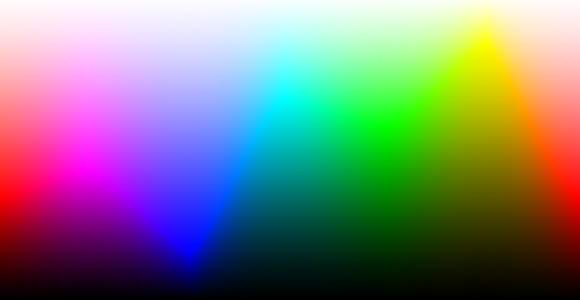
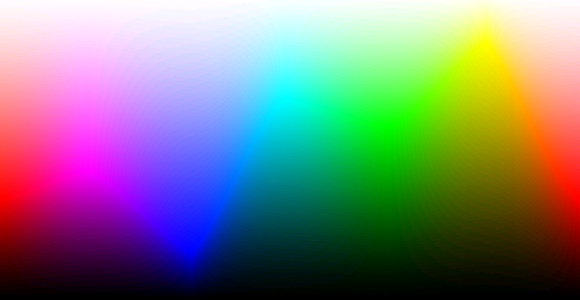
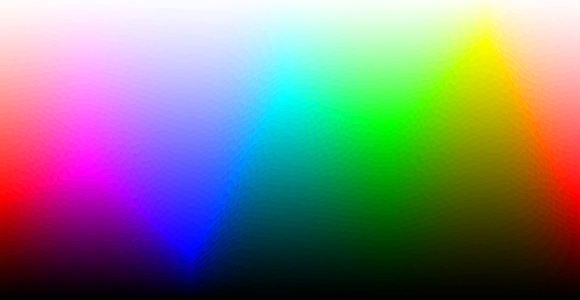
These are the examples of the same picture with different amounts of bits. There is a clear difference in the 8 bpp compared to 24 bpp. However between 24 bpp and 16bpp one, there is not a noticeable difference at all.
Source: http://www.cambridgeincolour.com/tutorials/bit-depth.htm
Navigation
Navigation is the system we refer as accessing the information on the World Wide Web through an organized hypertext and hypermedia. We interact with the information on the network by using a software known as Web Browser, which is what you are using right now.
Usually it involves interacting with links that takes you to an external website such as when you have social website links such as Facebook and Twitter. There is also an internal link that takes you to somewhere else on the page, this process is called anchoring.

Navigation
Navigation system also utilizes nav-bar, which is short of navigation bar an example of navigation bar can be found almost everywhere even on this webpage. Here is an example of nav-bar which has a home icon inserted and 2 drop down menus represented with small v icon at the end of each button's text, designs may differ but it is generally the same thing.

Rollover buttons:
Some buttons may try to incorporate interactive element and some animation to itself. The way to do this would be a rollover images. Take a look here at this button, you can see that when you move your cursor over the button the button turns pink which indicates that the animations are taking place. It just makes it much more professional to have such a thing.


There is also another type of icon called favicon, which I have seen when I do layouts settings on this blog it is which can only be an image of 150 x 150 pixels. But most web have favicon that is related to the website itself, like for example Google we would be able to guess what it is.

This blog for example can have customized favicon too, plus there are animated ones too where they use GIF format like this one for example.

This website has a heavy use of animations to bring out his own project artwork and introducing the story in but it works by scrolling down the page.
There are many logos that we have seen but have not taken a moment's notice to recognize how complex the icon takes to make and skills to think one up.
Usually it involves interacting with links that takes you to an external website such as when you have social website links such as Facebook and Twitter. There is also an internal link that takes you to somewhere else on the page, this process is called anchoring.

Navigation
Navigation system also utilizes nav-bar, which is short of navigation bar an example of navigation bar can be found almost everywhere even on this webpage. Here is an example of nav-bar which has a home icon inserted and 2 drop down menus represented with small v icon at the end of each button's text, designs may differ but it is generally the same thing.
Rollover buttons:
Some buttons may try to incorporate interactive element and some animation to itself. The way to do this would be a rollover images. Take a look here at this button, you can see that when you move your cursor over the button the button turns pink which indicates that the animations are taking place. It just makes it much more professional to have such a thing.
Icons

There are various ways we can the icons but the most common way would probably be to represent a link of some sort like for example the set of icons here has alot of recognizable icons such as the alarm clock tool, search tool - which is only a simple magnifying glass but it is so common that it is just quickly processed by your brain.
It is done this way because the goal of using icons on website designs is to help the user absorb and process information more efficiently.
Icons do not contrast or distract the content but instead it supports it and improves it, as well as enriching a minimal content to give it a better look and also an effective way to communicate without the use of words and also draw attention to the content.
Favicon
Favicon
There is also another type of icon called favicon, which I have seen when I do layouts settings on this blog it is which can only be an image of 150 x 150 pixels. But most web have favicon that is related to the website itself, like for example Google we would be able to guess what it is.
This blog for example can have customized favicon too, plus there are animated ones too where they use GIF format like this one for example.
Flash animations
Flash animations uses .swf or dot shockwave flash. Now then, you might've had heard it from many of flash games in the past requiring you to update SWF every now and again, and yes the flash game as you may have known, uses flash to animate and interact with.

Logo Graphics

This one for example is a letter G being used in a really creative way to produce a smiling face along with yellow color which represents intellect and calm in colour psychology.
Pixels & Resolution
Pixel is short for picture elements, and every picture on digital devices will display them using compositions of these small adjoining squares, however they are so small that you will not able to see the actual pixels when the image is on the computer monitor. These pixels are monochromatic and each pixel is a single solid color that is blended from some combination of Red, Green and Blue. This means that every pixels has a RGB components.

This picture is 260 px by 175 px. It has an image resolution of 175 by 260 which is 45 kilopixels (45,500 pixels). There is only TWO resolutions for any digital image and the first and most important is image resolution which is the actual pixel dimensions.The second is print or document resolution which is known as output resolution. Print/output resolution scales the existing pixel dimensions to a requested print or document size.
Digital images is a computer file that contains graphical information instead of text or a program. Pixels are the basic building block of all digital images, it can be stretched and zoomed but at the loss of quality and becomes in the state that is called pixelated, this will be discussed more in the next section.
The resolution which is measured in dpi/ppi (dots per inch or pixels per inch) and certain images needs a certain amount of pixels per inch and normally this image on the monitor is usually the standard 72 dpi which means we are seeing 72 pixels within each inch of the screen.
So how can we tell what resolution is best for my image? Well you see it depends on the image you want to print such as billboard would require quite a low resolution as low as 20 or quite high as 200 while a professional camera quality's image is printed out it is usually at 300 dpi.
Source: http://www.sphoto.com/homedd/

This picture is 260 px by 175 px. It has an image resolution of 175 by 260 which is 45 kilopixels (45,500 pixels). There is only TWO resolutions for any digital image and the first and most important is image resolution which is the actual pixel dimensions.The second is print or document resolution which is known as output resolution. Print/output resolution scales the existing pixel dimensions to a requested print or document size.
Digital images is a computer file that contains graphical information instead of text or a program. Pixels are the basic building block of all digital images, it can be stretched and zoomed but at the loss of quality and becomes in the state that is called pixelated, this will be discussed more in the next section.
The resolution which is measured in dpi/ppi (dots per inch or pixels per inch) and certain images needs a certain amount of pixels per inch and normally this image on the monitor is usually the standard 72 dpi which means we are seeing 72 pixels within each inch of the screen.
So how can we tell what resolution is best for my image? Well you see it depends on the image you want to print such as billboard would require quite a low resolution as low as 20 or quite high as 200 while a professional camera quality's image is printed out it is usually at 300 dpi.
Source: http://www.sphoto.com/homedd/
Image: Bitmap & Vector
 Most images we see are actually a bitmap(or raster) rather than a vector, which contains pixels which could be seen if you magnify it .
However vectors are very much different and you probably have heard about vector in maths during your high school years or some sort well yeah these vectors use that mathematical means to be used in here.
Never used a vector? Well you might not know it but you may have come across and used one before actually.
In Adobe Photoshop it actually uses text tool as vector which means when you use it you can only edit the size and width of the characters but to actually do like erase the text through with a line or something you will need to rasterize it. The picture below actually shows the message warning me to rasterize which means I will not be able to edit the text into another word without starting again.
Adobe Illustrator is all about using vectors especially the pen tool which makes a straight line but you use these anchor points to actually bend it.

Raster differs from vectors as they are measured in pixels and they cannot be enlarged without losing quality, different suppliers have specific size requirements for their processes which means they require a specific pixel resolution.
Raster images have certain amount of pixels within each inch and usually the higher the dpi the higher the quality of the image, but that is necessary not always true as some pictures you cannot tell the difference. Bitmap images are usually known to be uncompressed but there is also compressed ones as well.
Source: http://vector-conversions.com/vectorizing/raster_vs_vector.html
Image: Optimization & Compression
Image optimization is important, it is necessary for web designers as it is necessary to maintain a low size and high quality.
There are 5 different formats for images:
There are 5 different formats for images:
- JPEG
- PNG
- BMP
- GIF
- TIFF
Images formats are categorized into 3 types: lossy and lossless compression formats, and uncompressed formats.
Uncompressed formats has the most amount of data but they are exact. Bitmap formats such as BMP are generally uncompressed, but there are some exceptions.
Lossy compressions are generally suited for photographs and real life pictures. It is not suited for drawings and text, this is because compression artifacts from compressing the image makes it more standout. But it is a lossy format so it will not be exact representation of the original however it is very effective compared to lossless formats. The type of image that uses this format is JPEG.
Lossless compression formats are best for illustrations, drawings, text and any material which does not look best when compressed with lossy compression. It will encode all the information from the original when it becomes compressed and will be exactly as the original and wont lose any information. The types of images that uses this compression format are PNG and GIF but GIF only allows 8-bit images.
Lossless compression formats are best for illustrations, drawings, text and any material which does not look best when compressed with lossy compression. It will encode all the information from the original when it becomes compressed and will be exactly as the original and wont lose any information. The types of images that uses this compression format are PNG and GIF but GIF only allows 8-bit images.
Source: http://stackoverflow.com/questions/419584/what-is-the-difference-between-jpg-jpeg-png-bmp-gif-tiff-i
Image: JPEG
 |
| JPEG image with worst to best compression from left to right |
JPEG, most often seen as .jpg extension, stands for Joint Photographic Expert Group and is commonly used method of lossy compression for digital photographs. The compression degree is select-able and allows a tradeoff between storage size and image quality. A typical compression via this method achieves 10:1 compression with little to no perceptible loss in image quality and is most commonly used in digital photographs.
The maximum image size for JPEG is 65535 x 65535 pixels

 |
| Game Sprite GIF |
GIF or Graphics Interchange Format and is a bitmap that supports up to 8 bit which allows a single image to have up to 256 different colors from the 24-bit RGB. It also supports animations and allows a separate palette of up to 256 colors per frame.
GIF is popular on tumblr and many entertainment purposes website as it offers an eye-catching image that is animated, it can show parts of video without buffering in a GIF form which can be used to easily get across your points.
These are some of what GIFs can do.
 |
| Edited film clip GIF |
- GIF are compatible for sharp-edge line art (eg. logos) with limited number of colors. This utilizes the format's lossless compression which favors flat areas of uniform color with well defined edges.
- GIF can be use to store low-color sprite data for games like this one for example, it looks 3D but actually it just a cleverly use of color shading.
- GIF can be used for small animations and low-resolution film clips
Source: http://en.wikipedia.org/wiki/Graphics_Interchange_Format
Image: PNG
 |
| Rubiks cube with transparent background |
PNG supports palette-based images (24-bit RGB or 32 RGBA colors), grayscale images. It was designed to transfer images on internet and not for any professional quality print graphics and does not support non-RGB color based images.
JPEG formats could produce file smaller than PNG for photo-like images as previously mentioned, JPG uses a lossy encoding method which is designed for photographic images, it has low-contrast transitions and has some amount of noise or some sort of irregular structures.PNG is also a lossless but JPEG is not, so it produces some noticeable visual artifacts around high-contrast areas as seen on the left.
However choosing to use PNG will result in a high increase of file size but with a gain in quality but when storing images that has text, line art or any graphics with sharp transitions and large amounts of area with solid colors then the PNG can compress image data more than a JPEG can, but only PNG supports transparency.
Image: BMP
BMP files also known as bitmap image files or device independent bitmap (DIB) file format or simply known as bitmap. It is used to store bitmap digital images which are 2D digital images of arbitrary width, height, and resolution both in monochrome and color and optionally with data compressions, alpha channels and color profiles.
So generally bitmap are just everything except vector which uses different type of format and is a form of maths used in the art and other media graphics.
Image: TIFF
TIFF or Tagged image File Format is a file format for storing raster graphics images, and is widely used among graphic artists in the publishing industry and both professional and amateur photographers. The format was created by the company Aldus for desktop publishing but it is now under the control of Adobe Systems.
The TIFF format is supported by image-manipulation applications, by publishing and page layout application and by scanning, faxing, word processing, optical character recognition and other application.
Bit Depth
Bit depth refers to how many unique colors are available in an image's color palette in terms of binary code of 0 and 1, also known as bits. These so-called bits are used to specify each color and it doesn't mean a picture will use all of the colors, but it can be specify colors with that level of precision. A gray scale image will have bit depth to determine how many unique shades are available. So the higher the bit depth the more shades and color can be encoded due to more combinations of 0 and 1.
| Bits Per Pixel | Number of Colors Available | Common Name(s) |
|---|---|---|
| 1 | 2 | Monochrome |
| 2 | 4 | CGA |
| 4 | 16 | EGA |
| 8 | 256 | VGA |
| 16 | 65536 | XGA, High Color |
| 24 | 16777216 | SVGA, True Color |
| 32 | 16777216 + Transparency | |
| 48 | 281 Trillion |
24 bpp
16 bpp
12 bpp
10 bpp

8 bpp
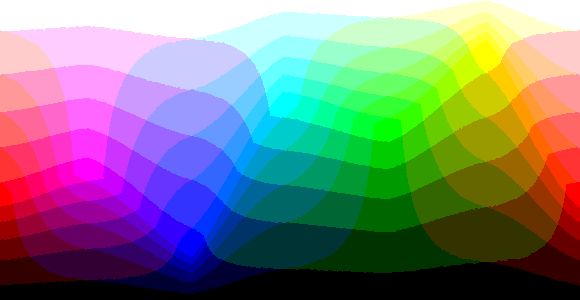
These are the examples of the same picture with different amounts of bits. There is a clear difference in the 8 bpp compared to 24 bpp. However between 24 bpp and 16bpp one, there is not a noticeable difference at all.
Source: http://www.cambridgeincolour.com/tutorials/bit-depth.htm
